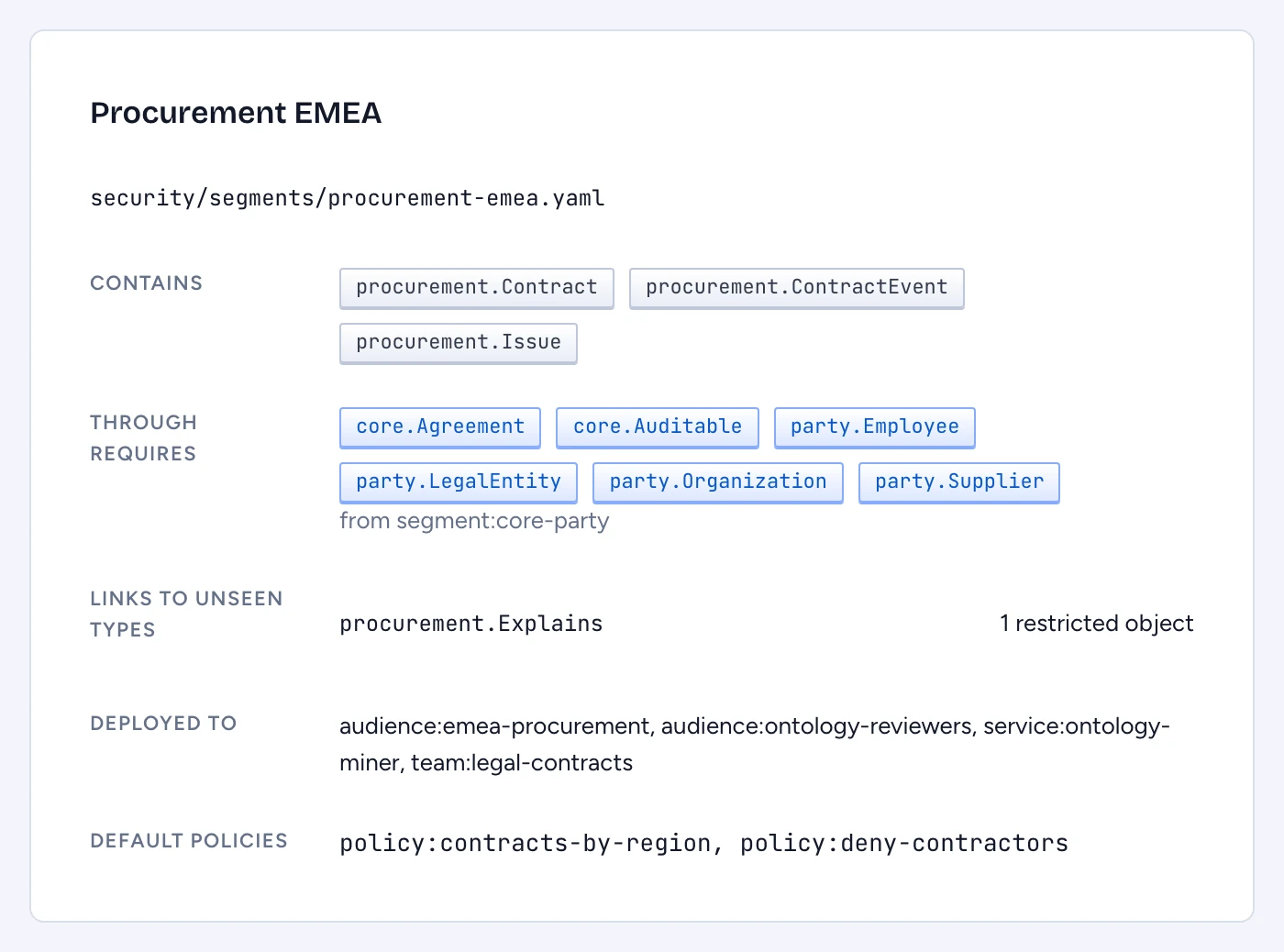
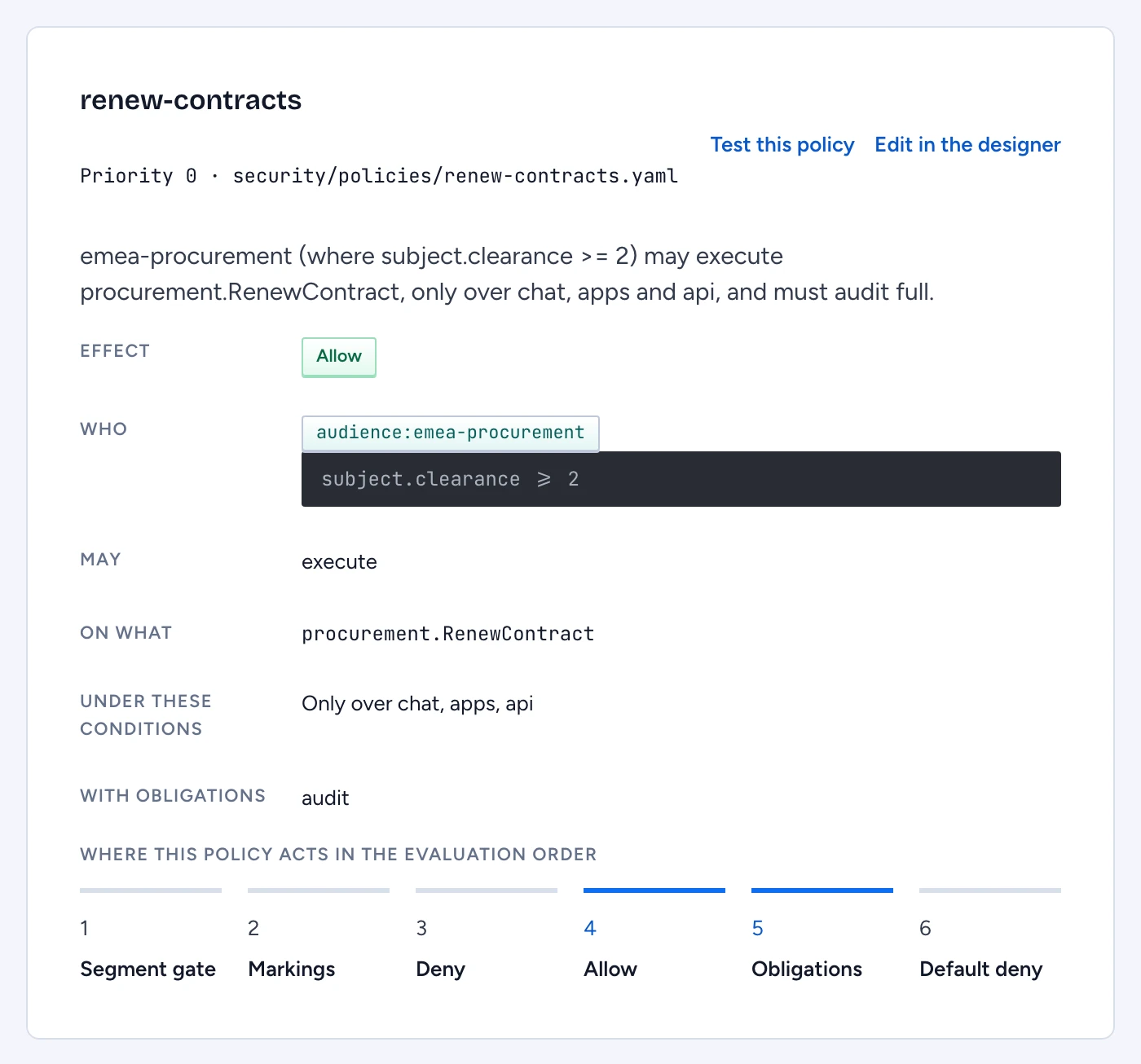
Two screens under Access & governance › Segments & policies show the security model as the policy engine reads it, for the draft proposal. Reading them needs an ontology-wide role that grants read, or manage-security: a security officer reviews the rules even when their own read access is narrow. You review here and edit in the designer's segment and policy forms; each policy links there with Edit in the designer.
Check a segment
A segment is the slice of the ontology an audience can see. Anything outside the segments deployed to a person does not exist for them: it is absent from answers, search, counts, autocomplete and the designer.
Open Segments and select one. The panel shows:
- Contains: the types the segment selects itself.
- Through requires: the types it reaches through the segments it requires, with the segment each comes from.
- Links to unseen types: every link that leaves the segment for a type in no included or required segment, and how it renders. Under
stubthe reader sees "1 restricted object"; underhidethey see nothing. - Deployed to: the audiences, groups and teams its deployments reach.
- Default policies: the policies the segment names in
defaultPolicies.
Closure is broken means a link reaches a type the segment can't see. Under hide that is error GLN-E521, under stub warning GLN-W523. Add the far end's segment to requires to close it, or keep the stub if showing "1 restricted object" is acceptable.
Read a policy
Open Policies and select one. Gluon writes each policy as one sentence, for example "emea-procurement (where subject.clearance >= 2) may execute procurement.RenewContract, only over chat, apps and api, and must audit full." Under the sentence you'll find:
- Effect: Allow or Deny.
- Who, May and On what, with Except listing the principals the policy leaves out.
- Under these conditions: channels and CEL conditions, the CEL shown verbatim.
- With obligations: masking, justification, audit level or approval.
- The priority, the file it lives in, and problems such as
GLN-E531for an unknown audience or marking.
Where this policy acts in the evaluation order highlights its place among the six steps every request passes:
- Segment gate: outside the person's segments, the thing does not exist.
- Markings: the person must hold every marking on the type, the property and the row. A role can't override a marking.
- Deny: any matching deny ends evaluation.
- Allow: at least one allow must match.
- Obligations: the obligations of every matching allow merge, and the most restrictive wins.
- Default deny.
Two rules catch people out. A condition over an attribute the person lacks is unknown, and an unknown allow does not match while an unknown deny does, unless the policy guards the attribute with has(...). Mirrored source ACLs add a further filter on top of all six steps.
See who a change lets in
When the draft widens access, the Policies screen says so above the list, and each affected policy carries a flag:
- Widens access (
GLN-W651): the screen names the people who gain, resolved from the directory: "Gain access: ...". - May widen access (
GLN-W652): the analysis can't decide before the policy runs, for example a condition over request context. The screen lists who may gain.
Either flag means "A security officer must approve it before it merges." Names are limited to people a deployment reaches and whose markings pass for the widened type. When nobody can be named, the screen says "No one in the directory could be named" and you review the change by hand.
Read a GLN-W652 list with care. It includes everyone the policy's subjects match, people who already had access among them, because the analysis can't tell which condition changed. A removed marking or a widened resource is reported with its principals and without names.
Test before you approve
Select Test this policy to open the access explainer. Tick Decide with the draft proposal, before it is proposed, then check one person who should gain access and one who shouldn't. Save each as a Test, so the proposal carries both cases into review and every later change is checked against them.