Every customer's documents are different. An extraction profile tells the ontology builder what to look for in one source: invoices and their numbers in a finance share, contracts and renewal dates in a legal library. You edit it in the designer like any other resource, and you can try a draft on real records before you save it.
Before you start
- You need a role that lets you edit the package's extraction profiles.
- The preview uses the same extraction model as the ontology builder. Your administrator sets one: an approved Model of kind
extraction, or an extraction route on Admin › Models. - The preview reads records as you. It uses only records of the source that you may read yourself.
Edit a profile
- In the designer, open the profile from the catalogue, or create one with New element and the kind ExtractionProfile.
- Write
focus: what to report and what to skip, in plain sentences. Name the kinds of things, the words your documents use for them (also in other languages) and the values you want, such as numbers, amounts and due dates. - List the sources the profile is for under
sources. A profile nameddefaultis used for every source that no other profile names. - Set
limitsif the defaults do not suit you. See ExtractionProfile for every field.
Only focus is prompt text. Gluon's grounding rules come after it, and no profile can change them: every finding must quote its record character for character, and sentences in a document that try to give the model orders are removed first.
Preview a draft
- Below the YAML, find Preview. If the profile names more than one source, pick the source to try.
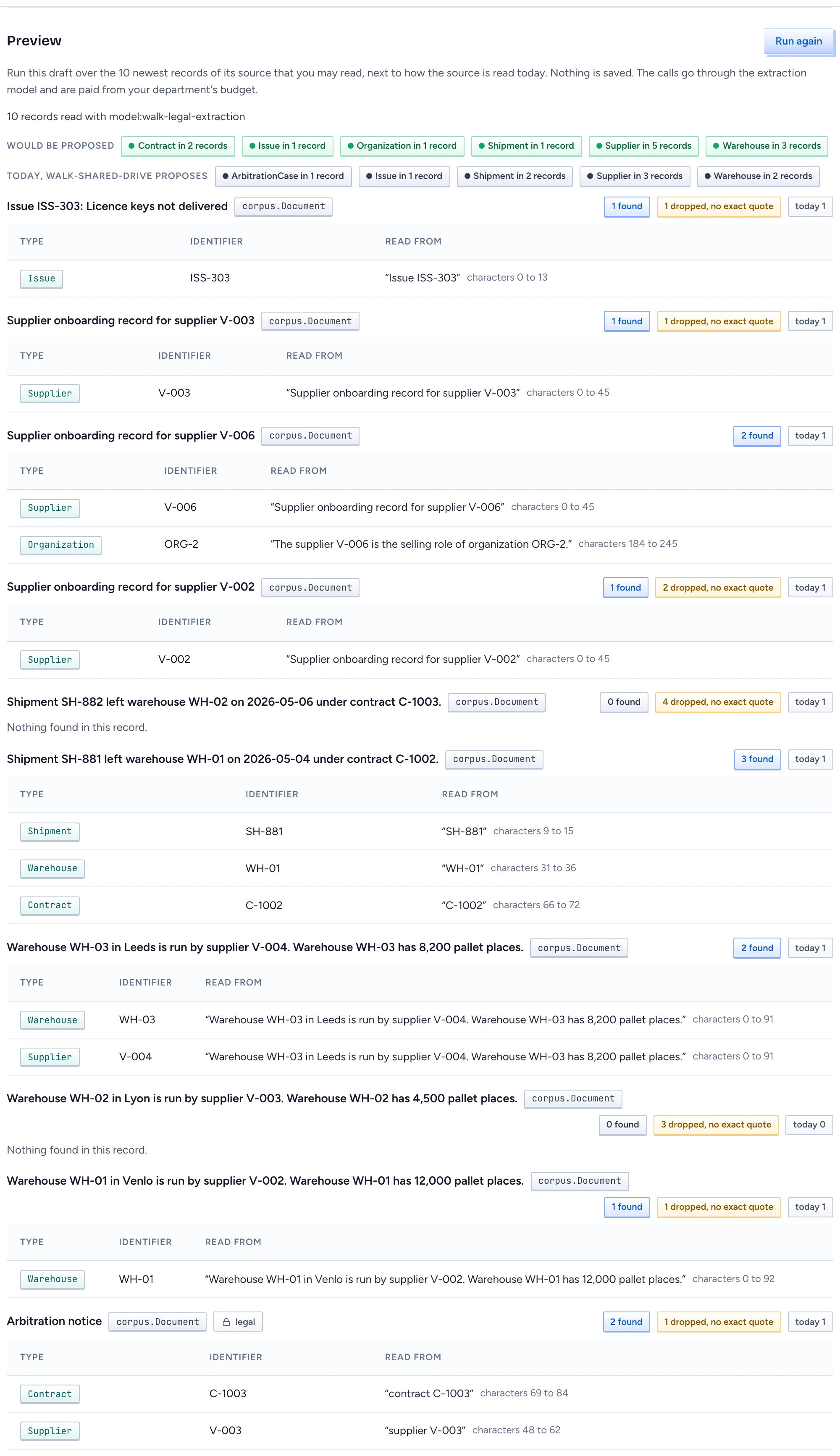
- Click Run preview. Gluon runs the draft as it is in the editor, saved or not, over the 10 newest records of that source that you may read.
- For each record the panel shows what the draft found: the type, its identifier and the words it was read from, with their place in the record. A finding whose quote was not in the record is dropped and counted.
- Would be proposed lists the types found in at least
minSightingsrecords. The ontology builder proposes only those. - Under it, Today lists what the source is read for now on the same records: by the profile in main that names the source, or by the built-in rules when none does. Each record also shows how many findings today's reading has.
- Change
focusorlimitsand click Run again until the findings are what you want. Then save.
Nothing is saved by a preview. Each record is two calls to the extraction model, one for the draft and one for today's reading, paid from your department's budget.
When the preview does not run
- No extraction model: no Model or route serves the extraction kind. Follow Open Admin › Models, or ask your administrator.
- Fix the draft first: the draft has validation errors. They are listed with their codes. Fix them and run it again.
- Pick a source: the profile names no source. Add one under
sources. - Records withheld: the source has records, but none that you may read. Records you may not read are never sent to a model.
- No records to read: the source has no records yet.
- The preview was refused: for example, your department reached its monthly spend limit. The reason is shown.
Limits
- The panel reads the newest records. The API also takes up to 10 chosen record ids (
records); the panel has no picker for them yet.