Chat: the home screen of Gluon Desktop. It answers questions over the records your sources brought onto the Mac: notes, mail and MCP server records. Citations: every answer names the records it used. Shape: same as cloud chat. Permission check: none; everything on the Mac is yours.
Before you start you need a source that is ready to answer (it has records, or one of its tools is on) and a Model chosen for Answer questions under AI connections. The Sources table, the setup guide and the chat box all use this one test. A model for Search by meaning is optional: without it Chat finds records by their words only. The welcome guide walks through both.
Where your question goes depends on your models. With a model on this Mac (a local model file, or Ollama on this Mac) for chat and for search by meaning, nothing leaves the Mac. With a remote service, such as an Anthropic or OpenAI key, the question and the passages it found go to that service. The line under the question box says which.
Start from the home screen
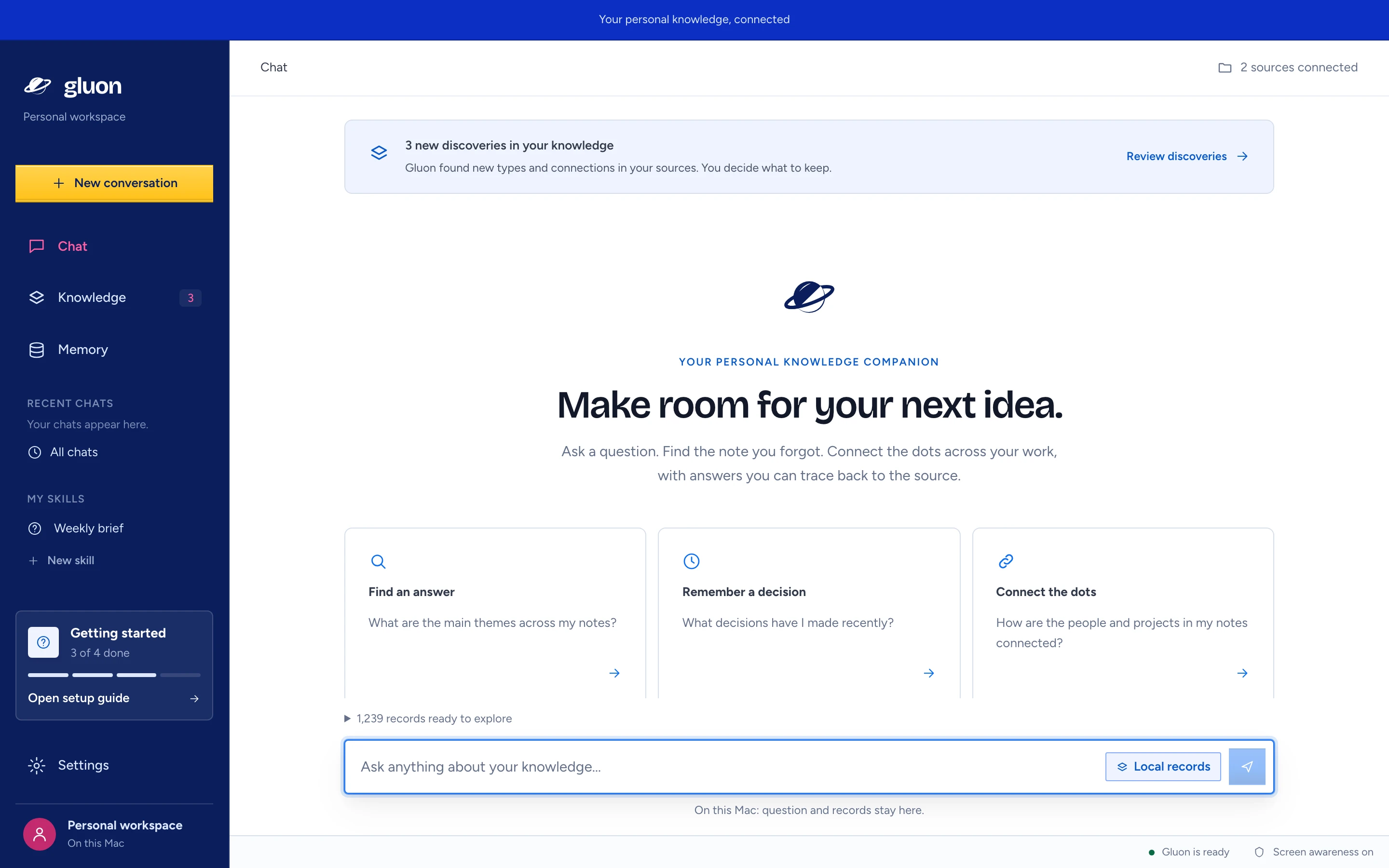
When the conversation is empty, Chat shows "Make room for your next idea." and three example cards: Find an answer, Remember a decision, Connect the dots. Press a card to ask its question. The cards show only when status has loaded, a chat model is chosen and a source is ready to answer.
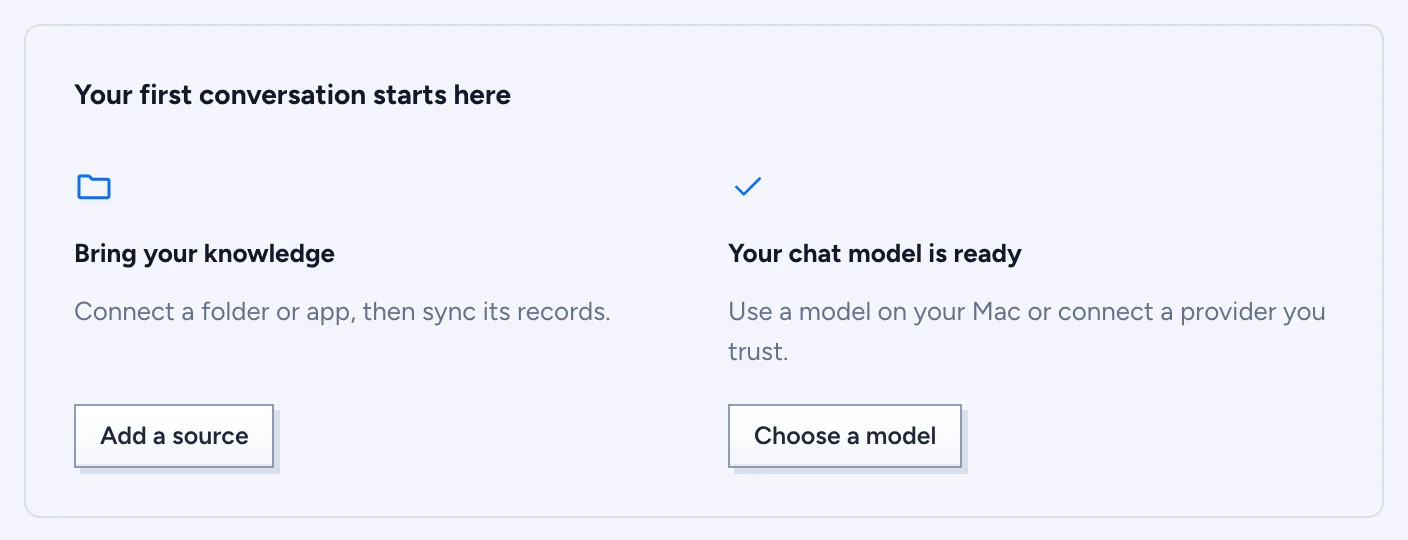
- Until then a panel, Your first conversation starts here, shows two steps: Bring your knowledge (Add a source, or Manage sources once a source is ready) and the chat model, headed "Choose a model to start chatting" or "Your chat model is ready", with Choose a model. Without a ready source the screen reads "Give your ideas a place to connect.". Until both are done, the question box is off.
- With discoveries waiting, a banner heads the screen: "n new discoveries in your knowledge". Review discoveries opens Knowledge. Accepting or dismissing a discovery there updates the banner and the count beside Knowledge. If the list cannot be read, the banner says "Could not check for discoveries"; press Try again.
- Chat refreshes what it knows every 8 seconds, so a source you just read and a model you just chose show up without a restart.
Ask a question
- Open Chat. Above the question box, n records ready to explore opens to say what Chat can search: "1,239 records · 3,412 of 3,412 chunks embedded", or "… search by words only" without a model for search by meaning.
- Type in Ask anything about your knowledge…, or press an example card. Questions are 2,000 characters at most.
- Press send. The answer streams in; asking again stops the one still running.
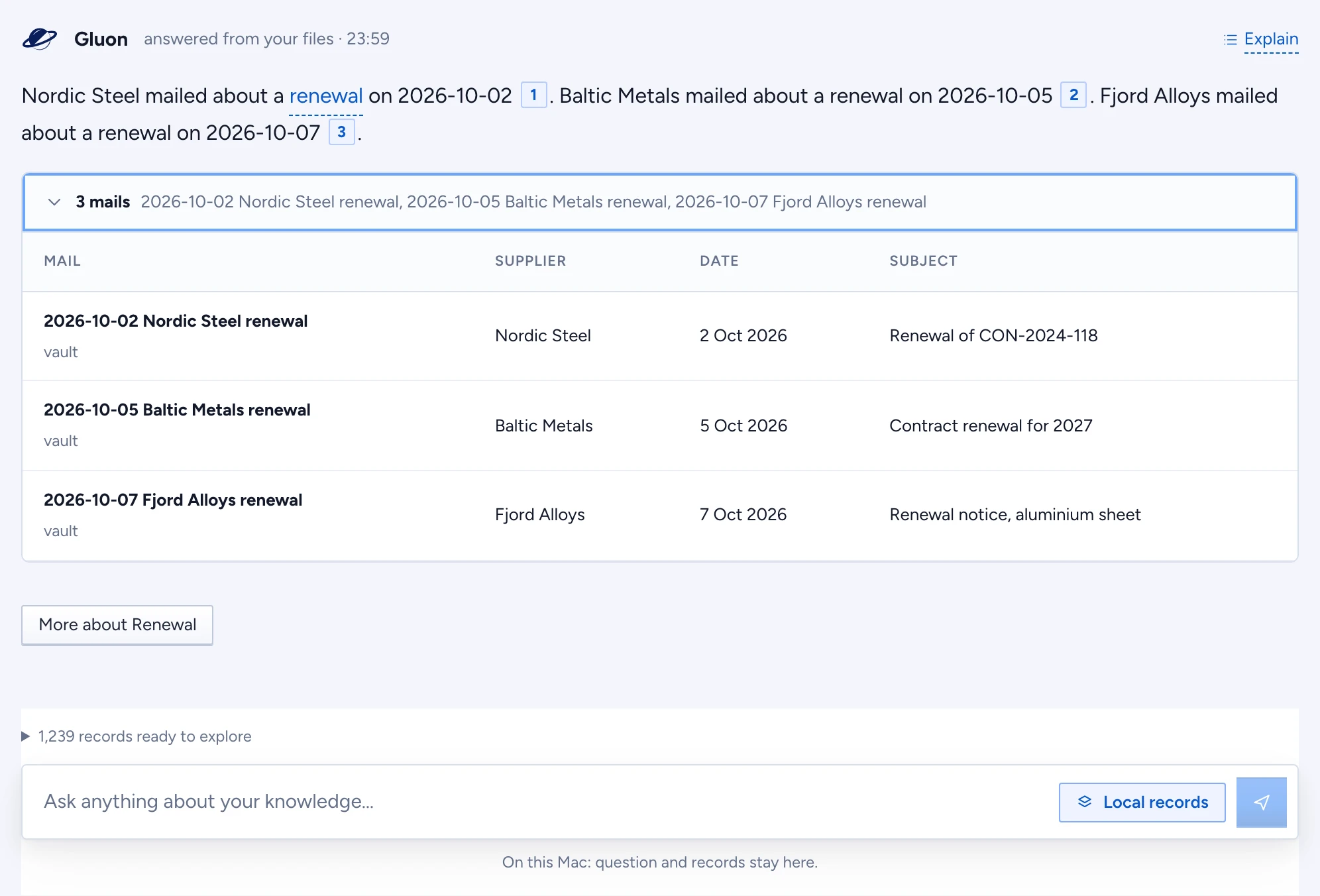
The answer is headed "answered from your files" with the time. Then:
- Prose with cites: each numbered cite is a record the sentence rests on. Opening a cite shows the record's own date beside its source, such as the day a mail was sent, and the answer's explanation shows it under each record it read.
- Attachments: a cited file (a PDF, Word or PowerPoint file, an image) shows like a mail attachment, its icon and name. Point at it for its kind, size and source; press it to open it where it was cited.
- One table: a row per other cited record, with the three fields most of them share. It opens folded to one line, the count and the first few names ("5 notes cluster-15540, cluster-17629, cluster-03551 and 2 more"); press it to show the table.
- Explain, at the top right of the answer: opens the answer's full explanation in a Sheet on the right: the trace, the timings ("First words after 0.8 s, answered in 2.3 s"), How this was reached (per record, the source it came from with its logo, how it was found, such as matched your question, and the record with its file icon, with Open lineage), the rules from your knowledge it was held to, and the facts it read. While the answer is coming, its progress shows under it.
- More about … chips to ask a follow-up about a record the answer names, or a type from your knowledge it mentions. A note that is cited but never named in the answer gets no chip.
Today's date goes with every question, so "this month" means this month.
The table shows what a person reads, never a source's technical fields: no ids, MIME types or byte sizes. A cited file shows what kind it is and how large, such as "Word document" and "962 KB".
A part of the answer Gluon could not find in its cited source has a light dotted underline; point at it to read why. A sentence that cites no source at all, such as a lead-in to a list, is underlined the same way and says "No source cited". The attention card at the top counts them. When the answer cites a passage of a file, a second check runs just after the answer appears (on a hosted chat route, not the small local model): it quotes the words behind each claim and Gluon checks them, so an underline can appear a moment later.
Pick a skill under My skills in the sidebar to have Gluon handle the question that way; it shows in the question box until you clear it. See Skills.
Conversations, and a draft
- Your conversation and your unsent question stay while you open Settings or Knowledge and come back.
- Point at one of your questions (or Tab to it) for Edit and Ask again. Edit puts the question back in the question box, so you can change it and send it. Ask again asks the same question again with what is on the Mac now: the latest records, knowledge and search, and with the skill it was first asked with. The new answer takes the old one's place; the old one is kept in the conversation's history with how it was made.
- The trash beside them removes that question and its answer from the chat. Undo in the message that appears brings them back. Gluon keeps the removed question and how its answer was made; it no longer shows in the chat or steers later questions.
- While an answer is written, the chat scrolls along with it. Scroll up to read something else and it stops following until your next question.
- Every conversation is kept on the Mac with how its answers were made. Recent chats in the sidebar lists the latest five, All chats every one. Right-click a chat in either list for Open, Rename and Delete. Delete asks first. A chat on legal hold keeps its name, so Rename is greyed out; on the Mac you can still delete it, because only the cloud enforces legal holds. See the trace.
- New conversation (top of the sidebar) on Chat asks "Start a new conversation?". New conversation clears the screen and the draft and puts the cursor in the question box; Keep chatting cancels. Your sources, knowledge and saved conversations stay.
- Signing in as someone else, or signing out, under Account starts a new conversation too.
Follow a citation, and the lineage
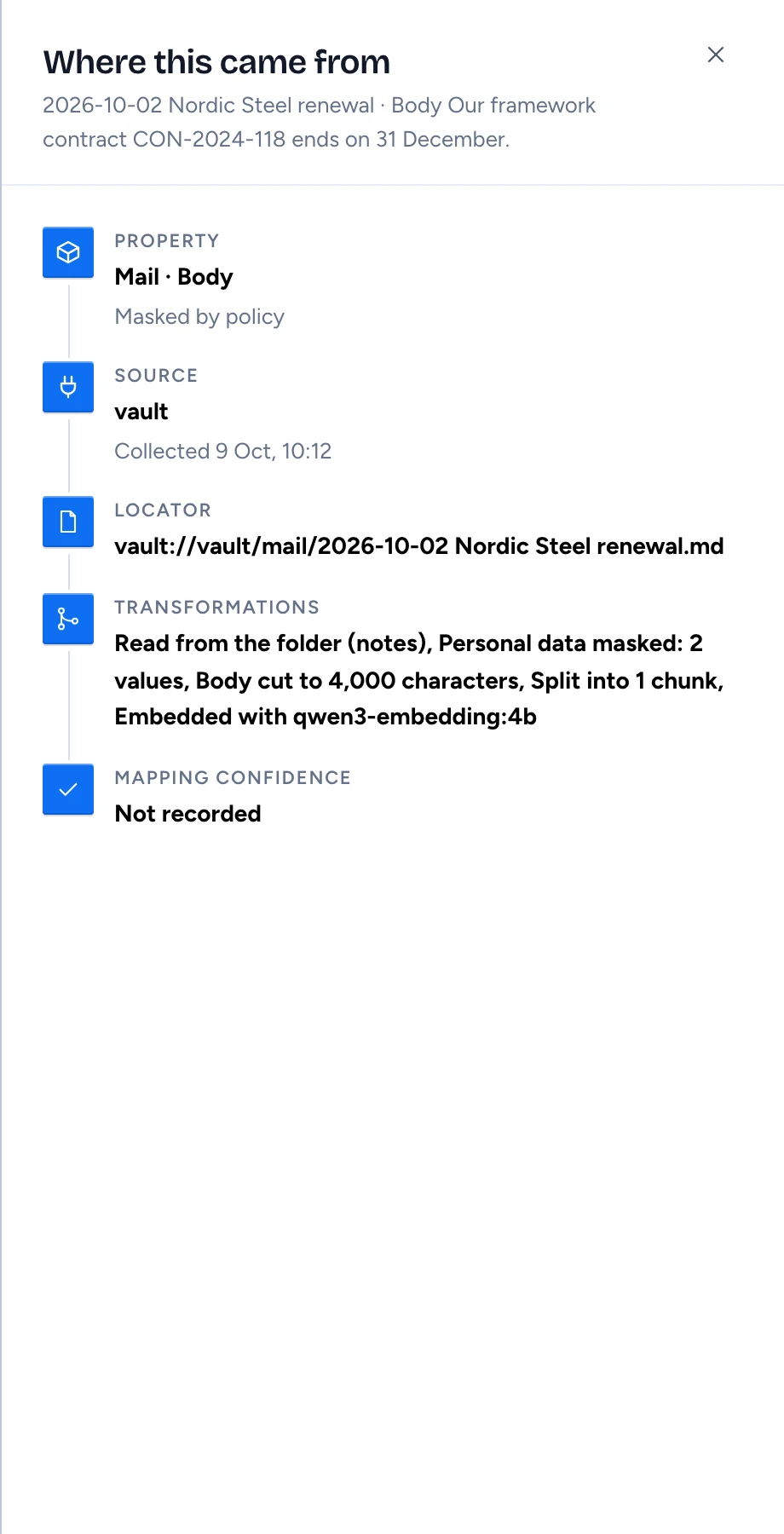
- Press a numbered cite. The Where this came from sheet opens on the right with the cited passage, formatted and with its line breaks. Only the words the answer shares with it are highlighted, and a type from your knowledge is underlined with dashes there too (its first mention in each paragraph), with the same quick look.
- A cited PDF, Word or PowerPoint file (an attachment from a mail source, for example) also offers Open on page n. Gluon fetches the file from its source, finds the passage on its pages and draws the page in the sheet with the passage boxed. Maximize shows the page larger, in a window over the sheet.
- The first time you cite a Word or PowerPoint file, the sheet shows View document. Press it: a dialog says the converter that turns the file into pages needs a one-time 80 MB download. Press Download 80 MB and view; the sheet shows the progress and then the page. After that it works offline, and a file you opened before shows at once.
- A scanned PDF has no text to find the passage in. When docling read it (Settings › Privacy & storage › Reading documents), Gluon uses where docling's text recognition put the passage, so the scan opens on its page with the passage boxed too.
- The sheet shows only the passage, and says why, for a scanned PDF read without docling, a passage that is not on the file's pages, a file the source no longer has, or a very large presentation the converter could not finish within a minute.
- Answers come formatted: short paragraphs, lists, and file names, paths and settings in code style. When several sentences or paragraphs in a row come from the same note, its number shows once, after the last of them. List items keep their own numbers.
- A type you accepted in Knowledge is underlined with dashes where the question or the answer first names it. Hover it for a quick look at the type, press it to open it on your knowledge map.
- Explain lists, under Rules from your knowledge (folded to its count, press it to open), the types this answer was held to: what each has and links to, in one sentence, with the source it belongs to. Gluon names and relates things by these rules.
- Press Explain and then Open lineage. The sheet traces the record: the source, when it was read, its locator (such as
vault://vault/mail/2026-10-02 Nordic Steel renewal.md), and the steps between: read from the folder or server, personal data masked (how many values), cut to length, split into chunks, embedded with which model.
Which records Chat searches
Chat searches every record on the Mac, from every source together (the count shows under the question box). Chat picks the best eight for each answer: for each record its best passage, and the same text only once. Each passage carries the record's date (a mail's date, a note's creation date), so the answer can compare dates. Ask for the latest, newest or most recent and the newest records count for more, including the newest notes in a folder named after what you ask for ("latest project" looks in Projects/ too). Name a type you accepted in Knowledge ("which invoices…") and records of that type count for more; a type still waiting for review changes nothing. Newsletters and digests count for less. Records come from your own sources only, never from the cloud, even when you are linked.
The attention card
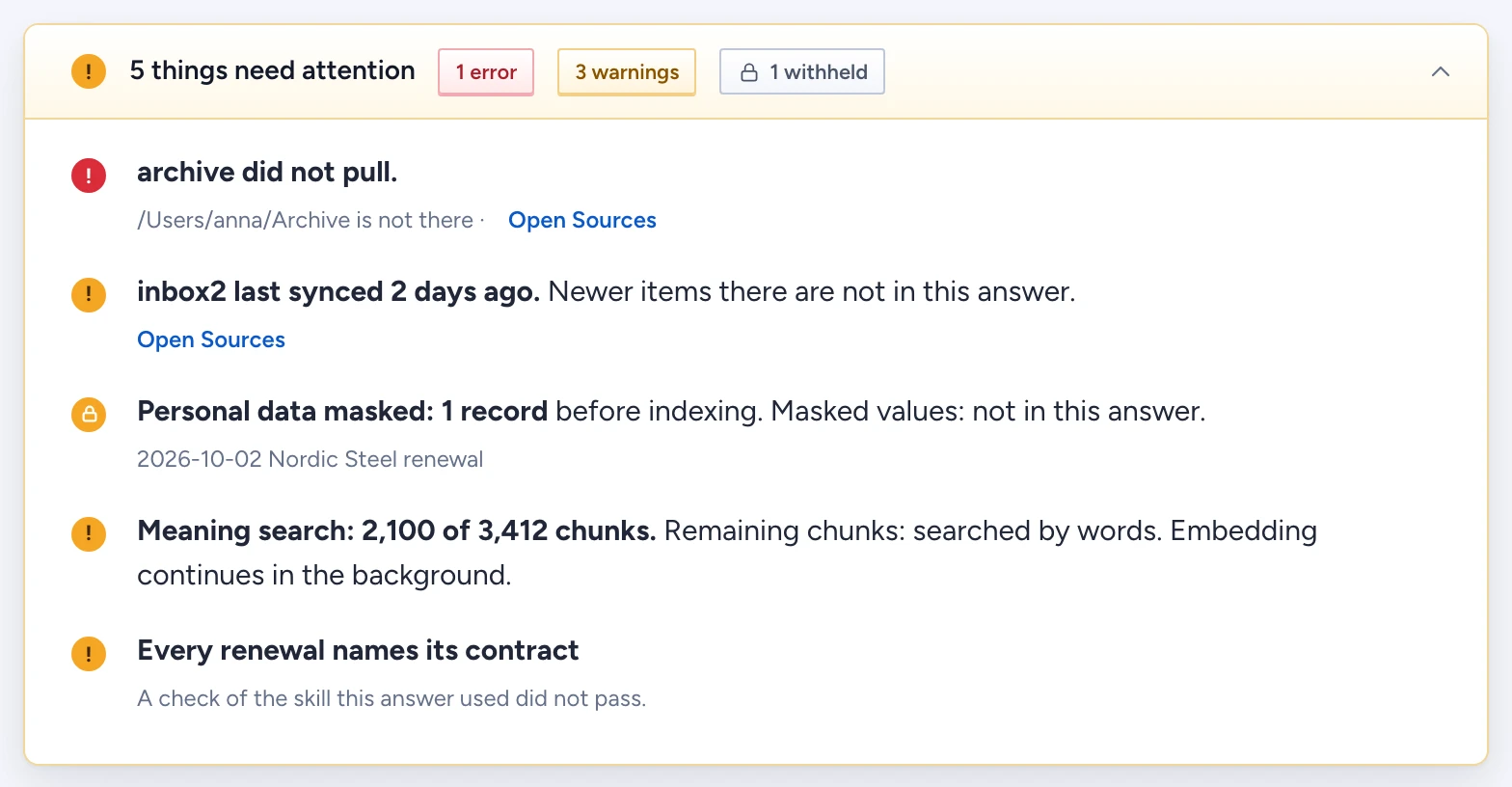
When something limited an answer, a card is pinned at the top of the conversation, under the chat header: "n things need attention". It collapses to its header.
| Row | Meaning | What to do |
|---|---|---|
| source did not pull. | the last read of that source failed, so its newest records may be missing | Open Sources and read it again |
| source last synced n days ago. | that source has not been read for a day or more, so newer items there are not in this answer | Open Sources and read it again |
| Personal data masked: n records | the masked values were never stored, so they are not in this answer | nothing: this is by design |
| Searched by words only. | no model is chosen for Search by meaning | choose one under AI connections, in Search enhancements |
| Meaning search: x of y chunks. | embedding is still running in the background | wait; the rest were found by their words |
| Meaning search is temporarily unavailable. | the embedding service failed for this question; Gluon used matching words | check the connection under AI connections |
| n details couldn't be checked against its source | parts of the answer were not found in a cited passage (dotted underline) | read those parts against the sources |
Other states
- Give your ideas a place to connect.: no source is ready to answer. Add a source takes you to Sources.
- Choose a model to start chatting: no model for Answer questions. Choose a model or Open AI connections takes you to AI connections.
- Chat status: did not load: press Retry.
- Open this in the Gluon app: the page is open in a browser tab, which has no local service.
The line under the question box says where the question goes: "On this Mac: question and records stay here.", or "Chat model: where. Sent: question and retrieved passages.". On the Mac there is no permission line: every record is yours.