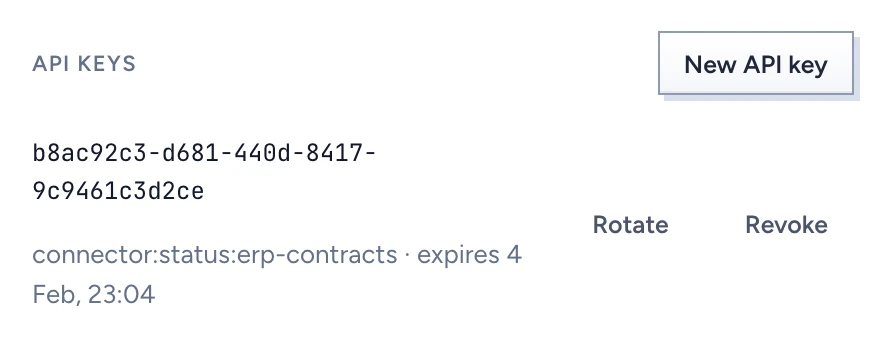
You manage three kinds of credential in the admin console: API keys for service accounts, the tenant's package signing keys, and the list of secrets held in the key service. People reach the API and MCP through their own sign-in, so API keys go to service accounts only.
Create a service account
- Open Users & organisation > People and click New service account.
- Give it a name that says what uses it, such as "Contract sync connector", and click Create.
A service account is a local identity that never signs in. It holds only the API keys you issue to it.
Issue an API key
- Open the service account and switch to Sessions and devices.
- Under API keys, click New API key.
- Tick the Scopes it needs.
connector:status:<source>lets a connector report the state of that one source;connector:deletes:<source>lets it report deleted records for that one source,connector:documents:<source>send its files, andconnector:acls:<source>confirm who may read its records. A source that mirrors permissions needs the last one: a record whose permissions were not confirmed in the last 15 minutes is withheld from chat. - Set Expires after (days), from 1 to 365. The default is 90.
- Click Create key.
Copy the API key now shows the key once. Put it in the connector's key store and click I have stored it. Gluon keeps only a SHA-256 hash of the key, so a lost key cannot be shown again. Rotate it.
Rotate or revoke a key
The key list shows each key's id, scopes and expiry.
- Rotate issues a new key with the same scopes and revokes the old one in the same step. The old key stops at once, so update the connector straight away.
- Revoke refuses the next request made with the key. The connector needs a new key to report again.
Every issue, rotation and revocation is audited.
Manage signing keys
Packages are signed with a key held in the key service, and the private half never leaves it. Open Storage, models & API > Signing keys. The table shows each Key id, where it is Held in (a file in development, Vault or a KMS in production), its public Fingerprint and its State.
- New signing key creates a key. Create one before anyone exports a package.
- Rotate makes a new key sign from now on. Packages signed with the old key still verify until you revoke it.
- Revoke destroys the private key, and every package it signed is refused on import from then on, here and in every tenant that trusts it. You type the key id to confirm.
Trusted keys of other tenants lists the keys you accept packages from. Trust a key… asks for the key id, fingerprint, public key and tenant of origin, plus your confirmation that you compared the fingerprint with the publisher over another channel. Withdraw trust refuses their packages from then on.
See which secrets exist
Keys and secrets in the key service, on the same page, lists every reference Gluon holds, who holds it and when it expires. The values stay in the key service. When the identity provider's client secret comes within 30 days of its recorded expiry, the Identity providers page warns you.