Every model Gluon may call is a Model resource in your ontology. Each one names its provider, gateway route, exact version, region, the markings it may receive and the audiences it serves. Its provider is the name of an AI connection, which holds the service's address and key (see Connect AI services and their keys). When the evidence for a request carries a marking that no approved model may receive, Gluon refuses the request before anything is sent.
Add or change a model
- In the designer, open a proposal and add or edit a Model. The form covers kind (chat, embedding, reranker, decision, extraction, evaluation or planner, picked from a list), provider, route, version, region, reasoning, markings, audiences, priority, limits, prices and fallbacks. Reasoning (Off, Low, Medium or High;
none,low,mediumorhighin the YAML) tells a thinking model how hard to reason before it answers; Off answers straight away and spends fewer tokens. Leave it empty for the provider's default. The model table shows it after the region. Department spend caps are edited in the YAML pane. - Name as fallbacks only models approved for every marking the primary may receive. The form flags a fallback approved for fewer markings (
GLN-E591) and a fallback to itself or to another kind (GLN-E592) as you type. - Submit the proposal. A new model, added markings, a changed region, provider or route, and new or emptied audiences all need the security officer's approval.
- Merge, publish and deploy. The deployed version's Models become the approved matrix within about 10 seconds, with no restart.
An evaluation model is the one Drift grades answers with: its judge, model verifier and conflict detector. Pick one from another model family than the one that answers, so no model grades its own work, and set a monthly spend cap for department:drift in the YAML pane, on the evaluation model and on the chat models your Capabilities pin (Drift's golden runs answer through them under that department). Without a cap Drift's calls are refused, as any department's are. Without an approved evaluation model, Drift's judged numbers show as not applicable.
A version change on an existing model is held after deployment. Gluon routes nothing to it until a shadow evaluation run through the gateway has scored that version. A Capability that pins models uses only those, narrowed further by the deployments that serve it.
Set a model per kind in the console
Open Storage, models & API > Models. Each kind of work has a card: Answer questions (chat), Discover knowledge (extraction) and Offer help on screen (decision), and under Advanced: search and grading the cards for Search by meaning (embedding), Refine search results (reranker), Plan searches (planner) and Grade answers (evaluation). For planning, a small, cheap model is enough; without one, the chat model plans.
Serves now says what answers that kind today:
- a Model name with "from the package": an approved Model in the deployed package. It always comes first, and a route on the card shows Standby: used only when the package has no Model of this kind.
- Console route on a connection: the route set on this card.
- No model: answers repeat the evidence, Fixed rules (decision) or No model: neither a Model nor a route is set for the kind. Decisions use fixed rules only then.
- Blocked: the package names a Model of this kind that cannot be served, for example because its connection is disabled, has no key or is in another region, the kill switch disabled it, or it waits for a shadow run to score it. This applies to decision too: a decision Model whose System One connection cannot serve it is blocked, not answered by fixed rules. Requests of that kind are refused, and holders of manage-security get an alert in the Alerts group. The route does not take over. Use the link on the card to fix the connection or the Model. A route the kill switch disabled also shows Blocked on its card, without an alert.
Approve a held model version now
A Model whose new version waits for a shadow run shows Blocked with "held until a shadow run on this matrix scores it" and an Approve now button. Use it when the version must serve before a shadow run can score it.
- Click Approve now. The dialog says that answers will use this model version at once, before a shadow run has scored it.
- Type the Reason, 1 to 1000 characters. The counter shows how many you used.
- Click Approve. The card serves the Model again within a moment, and a notice names the approved version.
The approval is audited with your name, the time and the reason. If someone approved it meanwhile, the dialog says so and the list refreshes. Without manage-security the button is off.
Choose which model plans
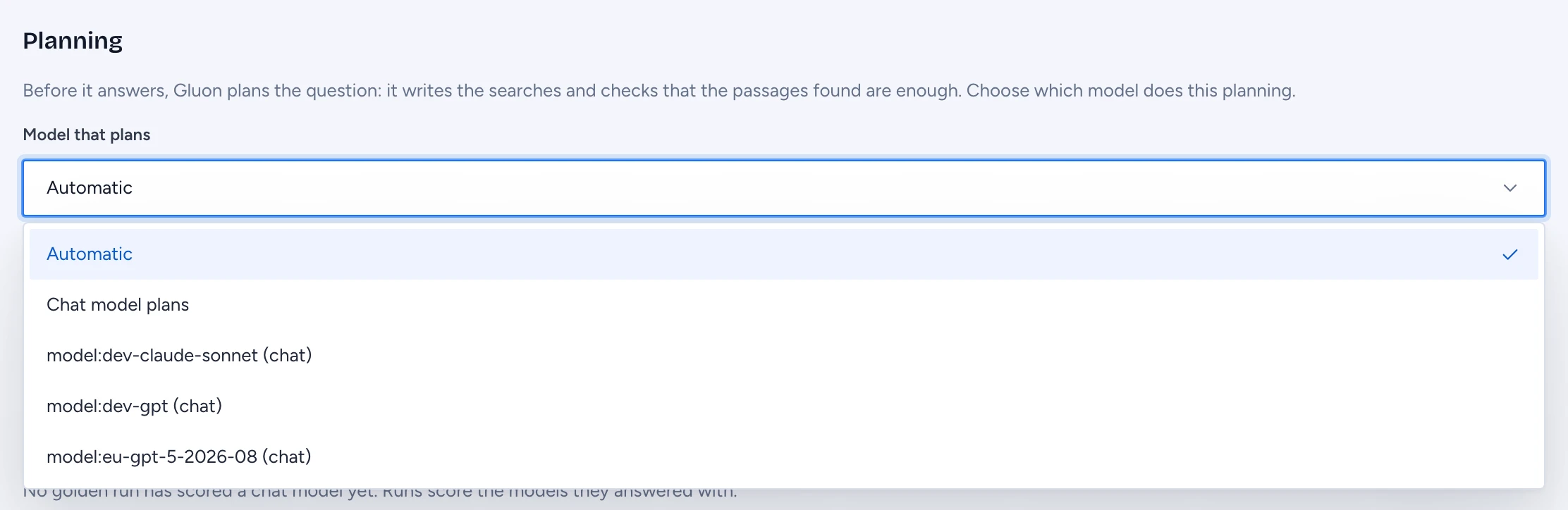
Before it answers, Gluon plans the question. Planning covers the search queries, the pick from a wide search, each turn of the search loop, the check that the passages found are enough, the context planner and the claims judge, which decides which sentences get a dotted underline. The Planning section under the cards sets which model does this.
- Automatic: an approved planner model plans. Without one, an approved decision model plans, and without that, the chat model. This is the default.
- Chat model plans: the chat model that answers also plans. Approved planner models are not used.
- A model by name: any approved planner or chat model. When it may not take a question (held, outside the capability's models, or not cleared for the question's markings), the chat model plans that question.
- Open Model that plans and pick a setting.
- Type the Reason, 1 to 1000 characters.
- Click Change planning. Answers use the new setting within a minute. You do not need to import a package.
The change is audited with your name, the time and the reason. Without manage-security the list is off. From a terminal, gluon models planner does the same.
To set a route:
- Click Set route (or Change) on the card.
- Pick a Connection. The list shows only the connection types this kind takes, each with its service logo; a disabled connection or one without a key is shown but cannot be picked. Decision takes a System One (Jev) connection only.
- Type or pick the Model, the model name on that connection. The names its last test listed are offered.
- For chat, extraction and evaluation, pick Reasoning if you want to change the model's default.
- Under May receive, pick the markings the route may receive. Unmarked evidence always goes; a marking you leave off is never sent to this route.
- For embedding, enter the Dimension, the length of the model's vectors (768 for nomic-embed-text).
- If the connection is paid (not on-prem), enter the Input price and Output price in EUR per 1,000 tokens and the Monthly cap, the EUR each department may spend through this route a month. Spend is booked per department, as for a Model, and calls stop at the cap. A route on an on-prem connection, such as Ollama, vLLM or LM Studio, needs neither and costs nothing.
- Click Save. Changing the embedding model, its dimension or its connection, or saving it after the connection's address changed, asks you to confirm a full re-index; until it finishes, search matches words only.
A saved route shows its connection, its price and cap when it has them, the markings it may receive and who changed it last, by name, with the time. Test sends one short request through the route and shows the time and a sample, or the error. Clear route asks first and says what serves the kind after. Without manage-security the screen is read only. Every change is audited.
Tune the reranker
A reranker Model reorders what search found before the answer is written. For each document it reads a window of up to 1,800 characters: the start of the record (its fields, such as owner, status and dates) and then the part that shares the most words with the question. The answer still reads the passages as ranked.
- How many documents it reads: the server setting
GLUON_RERANK_CANDIDATES, 100 by default and 300 at most. 0 turns reranking off on that server, even with an approved reranker Model. Ask your operators to change it. - How long it may take: the Model's
timeoutin the YAML pane, for examplePT8S. Without it, 3 seconds. A call that takes longer keeps the search order, and the trace says why.
Read the matrix
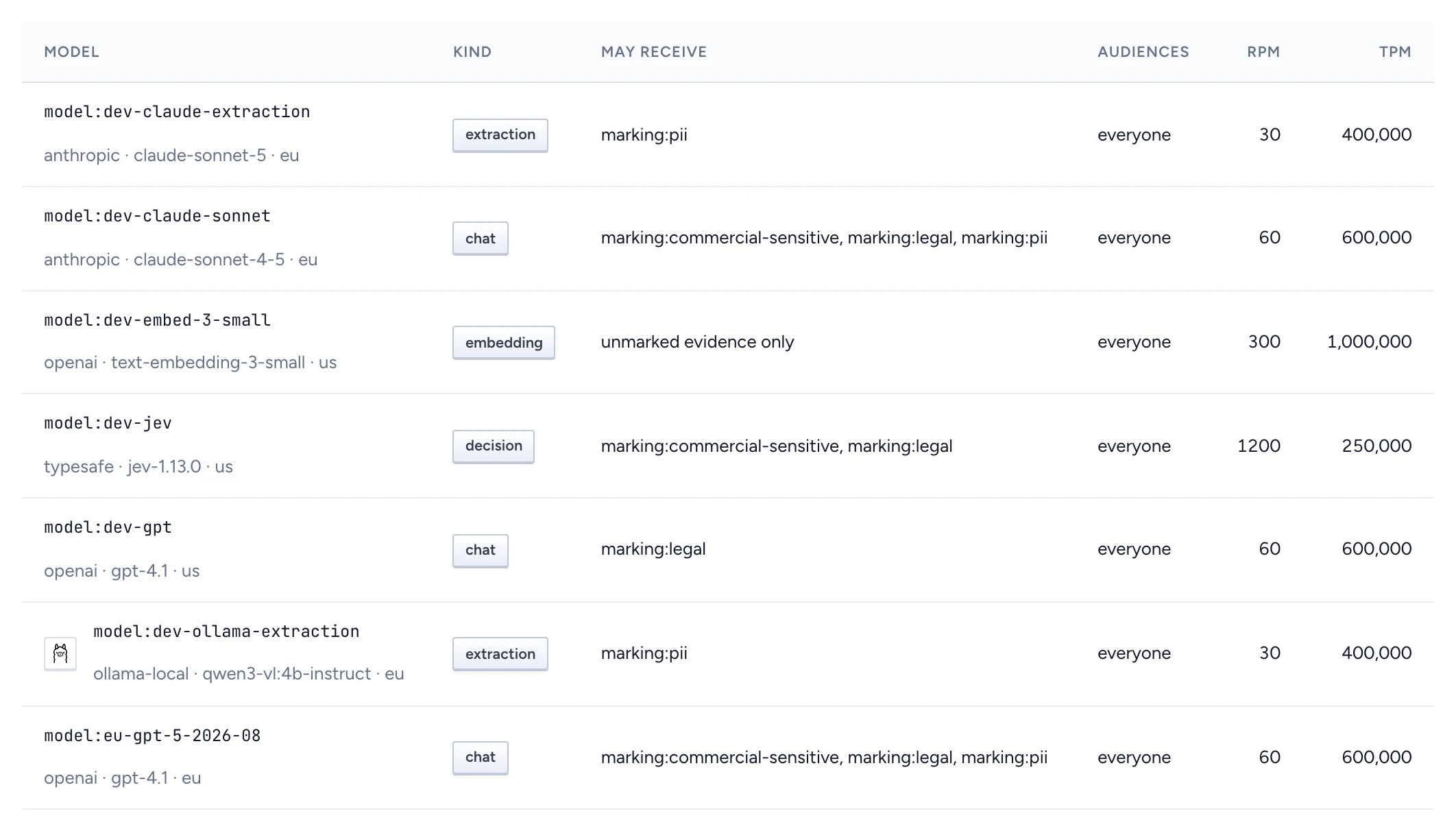
In the admin console, open Storage, models & API > Storage and models. Model matrix lists each model with Kind, May receive, Audiences, RPM and TPM. "unmarked evidence only" means the model receives nothing marked. The Model column shows the logo of the AI connection each model goes through. A model shown with a red reason, such as "connection anthropic has no key", is approved but not served until that is fixed. An entry labelled Console route comes from a route set on Models, not from the package.
Below the table, Pinned embedding names the one embedding model the index uses, Drift names the evaluation models that grade answers (or says none is approved, so Drift's judged figures show as not applicable) and warns when department:drift has no spend cap, and Spend caps shows each department's spend in EUR, what is reserved for requests in flight, and the monthly cap. A department at its cap is refused until the next month.
Test a route
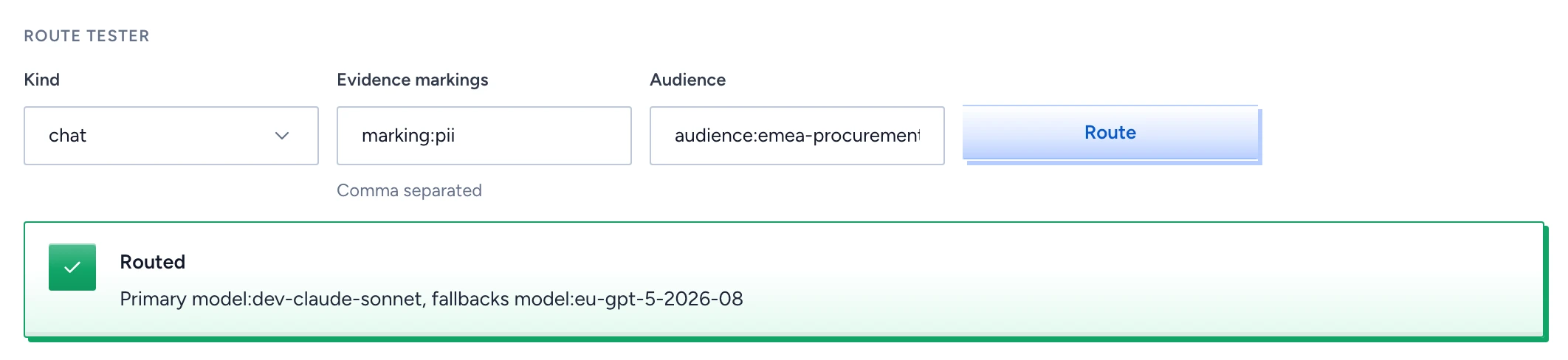
- In Route tester, pick the Kind.
- Type the Evidence markings, comma separated, for example
marking:pii. - Type the Audience, for example
audience:emea-procurement. - Click Route.
Routed names the primary model and its fallbacks in order. Refused, never routed gives the reason and names the marking. The tester also leaves out models the kill switch has disabled.
Fallback happens only on a transport error, a timeout, rate limiting or a server error before the first token, and only to the fallbacks the primary names.
Accuracy per model
Under the model cards, Accuracy against the golden set shows one card per chat model that has answered a golden run through the gateway: the model and its version, how many runs scored it, the latest run, and its figures. The figures are the share of key facts stated, agreement with the reference answer, citations of the right records, claims grounded in their sources, refusals where a refusal is expected and where it is not, how often it abstained, and the cost per answer. A new model is held until a run scores it, so its card appears before it serves. Runs answered in echo, with no gateway, score nothing and are left out.