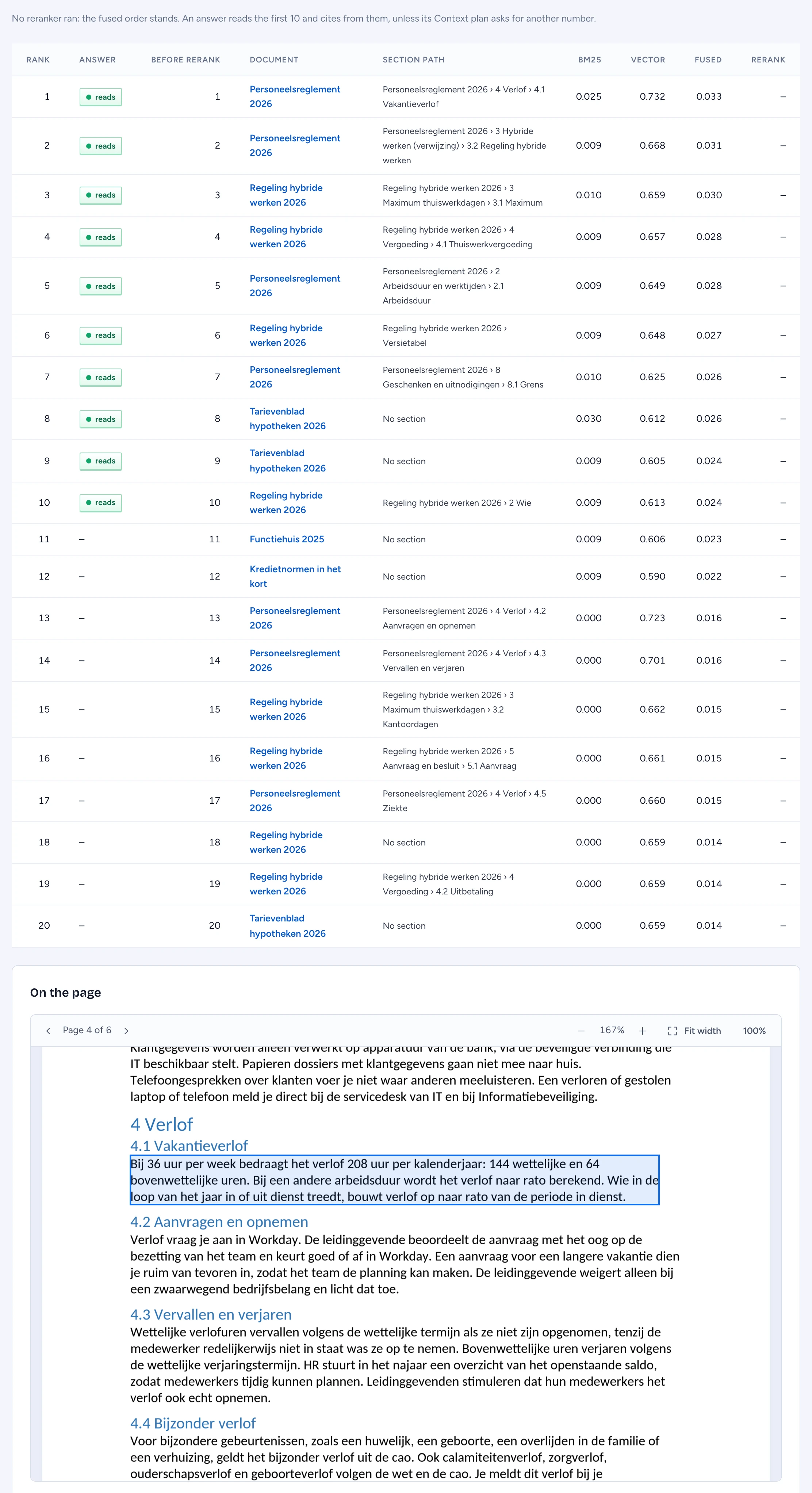
The retrieval playground answers one question: what would retrieval find for this person? It runs your question as the person you choose, through the same policy decision point chat uses, and shows the ranked passages with their scores before any answer is written.
Before you start
- You need the security officer's right to manage security, even to run as yourself: exact scores say something about documents a reader may not open. Every run is audited, without its question.
- The playground shows passages, never an answer. Passages that person may not read are counted, never listed.
Run retrieval as a person
- Open Sources, tools & skills > Retrieval playground.
- Type the Question.
- Under Run as, keep Myself or pick a person. Type in Find a person to narrow the list.
- Optionally name a Capability. It narrows what may be read and which reranker runs, as it does in chat.
- Choose how many Candidates to rank (10, 20 or 50) and press Run.
When you may not run as that person, the playground says so and shows nothing of theirs.
Read the candidate scores
Above the table, attention rows give the counts:
- Candidates withheld: passages that matched but that this person may not read.
- Duplicate copies collapsed: copies of one passage folded into the best-ranked copy this person may read. The collapse happens after the policy check, so a copy under another ACL never hides one they may read.
A line says which reranker ran, how long it took and how many candidates it moved, or that the fused order stands.
The table lists the candidates in final order:
- Rank and Before rerank: where the passage ended and where it was before the reranker.
- Answer: reads on the passages an answer would read and may cite. The line above the table says how many that is (10 unless the Capability's Context plan asks for another number); a passage below it is found but never reaches the model.
- Document and Section path: where the passage comes from.
- BM25, Vector and Fused: the keyword score, the vector similarity and the fused score retrieval ranked on. How they fuse depends on the search engine. On Elastic the fused score is the BM25 score plus ten times the vector score. On pgvector the keyword column shows Postgres's own text rank (much smaller numbers than BM25), and the fused score combines the two by rank: each passage gets 1 / (60 + its place) from each list it is in, so a passage near the top of both lists ranks first.
- Rerank: the cross-encoder's score, when a reranker ran.
Click a document to see that candidate boxed on its page below the table. The first candidate is shown after each run.
Nothing this person may read matches? The page says so, and the withheld count above tells you whether something was kept from them.